Get back into your vault.
ZZPass can't reset your password, because only you hold the keys. Instead you get two ways back in of your own. Set them up now and you'll never be locked out.
Forgot your primary password?
On a device where Face ID or Touch ID unlocks ZZPass, you can set a new one in under a minute.
-
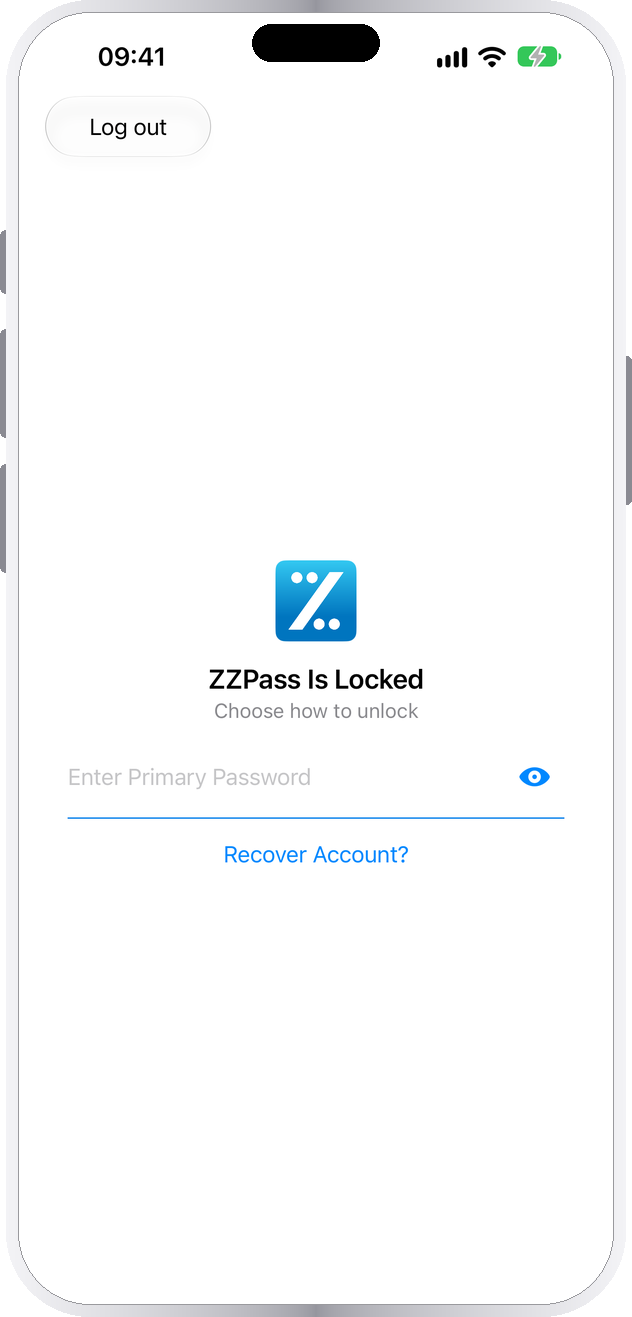
Tap Recover Account?
Type a password on the lock screen. After one wrong try, Recover Account? appears below it.
-
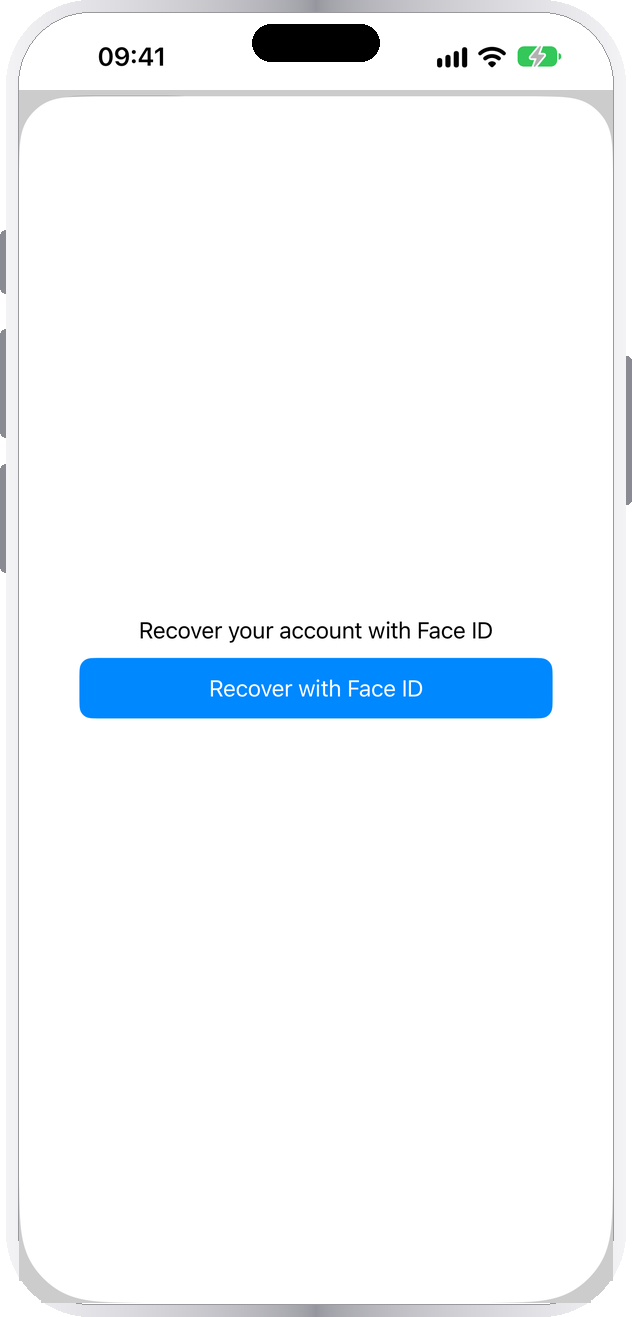
Prove it's you
Tap Recover with Face ID (or Touch ID). Your face or fingerprint stands in for the old password.
-
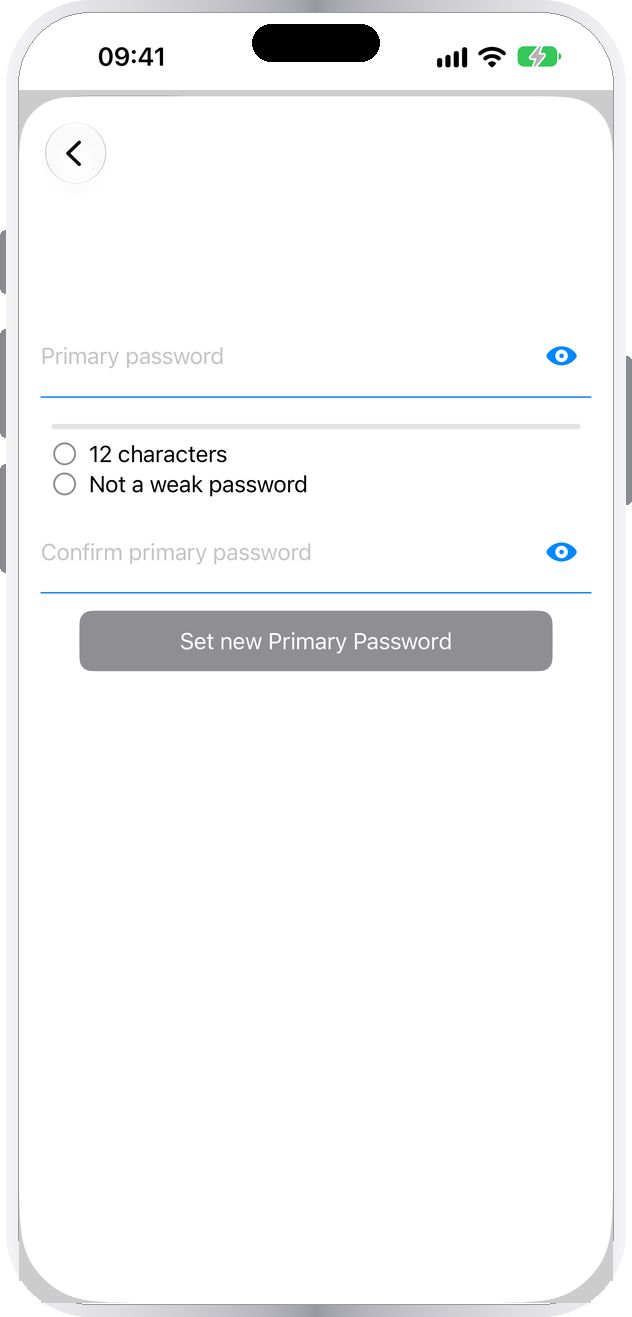
Set a new password
Choose a new primary password and tap Set new Primary Password. Then print a new Emergency Kit.


No Face ID on any device? Your primary password is printed on page 1 of your Emergency Kit. Recovery is also paused while ZZPass is locked out after too many tries, and if your Face ID or fingerprints changed since you turned it on. The lockout lifts by itself: 30 seconds after five wrong tries, rising to 15 minutes after twelve.
New phone, or lost every device?
Your vault is waiting in your iCloud. Two things open it: your Secret Key and your primary password.
- Sign in to the same Apple Account you used before, then install ZZPass.
- Open ZZPass and choose Log In.
- Tap Scan QR Code and scan page 1 of your Emergency Kit, or the code on another device's Devices screen. Or type your email and Secret Key.
- Enter your primary password if the scan didn't fill it in, and tap Log In. Your vault syncs down and opens.
The first sign-in on a device needs the internet, so ZZPass can reach your iCloud.

What gets you in, when.
Your Secret Key and your primary password solve different problems. Keep both, and every situation has a way back.
| What happened | What gets you back in |
|---|---|
| Forgot my password, still have my phone | Face ID or Touch ID recovery on that device |
| Forgot my password, no device | The primary password on your Emergency Kit |
| New or replaced device | Secret Key and primary password, or one scan of your kit |
| No device, no kit, password forgotten | Nothing. Not even ZZPass can open the vault. |
Your Secret Key
A code like Z1XXXX-XXXXXX-XXXXXX-XXXXXX-XXXX, made on your device when you created your account. Capitals and dashes don't matter when you type it.
It opens nothing on its own, and ZZPass keeps no copy.
Where to find it
- iPhone or iPad: Security → Devices
- Mac: Devices under Access in the sidebar
- Page 1 of your Emergency Kit
The first two need a vault you can unlock. Locked out, the kit is where it lives.
Two minutes today. Never locked out.
Turn on Face ID
In Settings → Security, turn on Use Face ID (or Use Touch ID). It's per device, so do it on each iPhone, iPad and Mac. It's the route back in that needs no paper.
Print your Emergency Kit
In Security → Emergency Kit, type your primary password and print. How to print and store it →
Pick a password you'll remember
A few unrelated words beat a short jumble of symbols. Long and personal, but nothing someone could guess about you.
Questions about getting back in.
Can ZZPass reset my primary password?
Why don't I see Recover Account?
I signed in to iCloud on my new phone. Why isn't my vault there?
Where do I find my Secret Key?
Is it safe to have my primary password printed?
I have no device, no kit and I've forgotten my password.
Ready before you need it. Print your kit today.
Face ID recovery and a printed Emergency Kit cover every way you could be locked out.