Your 2FA codes, right next to your passwords.
ZZPass keeps the six-digit codes sites ask for after your password, fills them in for you, and syncs them to every device. No separate authenticator app to lose.

Add a code in under a minute.
Start on the site: in its security settings, turn on two-factor and choose an authenticator app. It shows a QR code and a setup key. Then, in ZZPass:
-
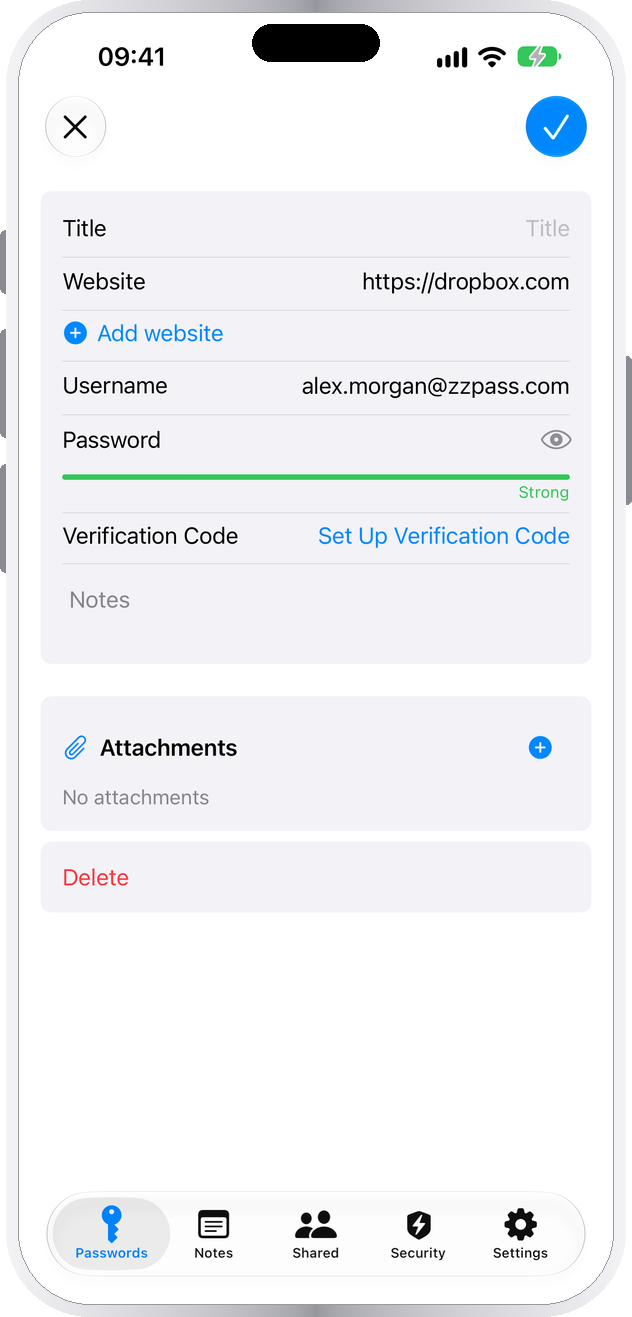
Open the login
Tap Edit, then Set Up Verification Code.
-
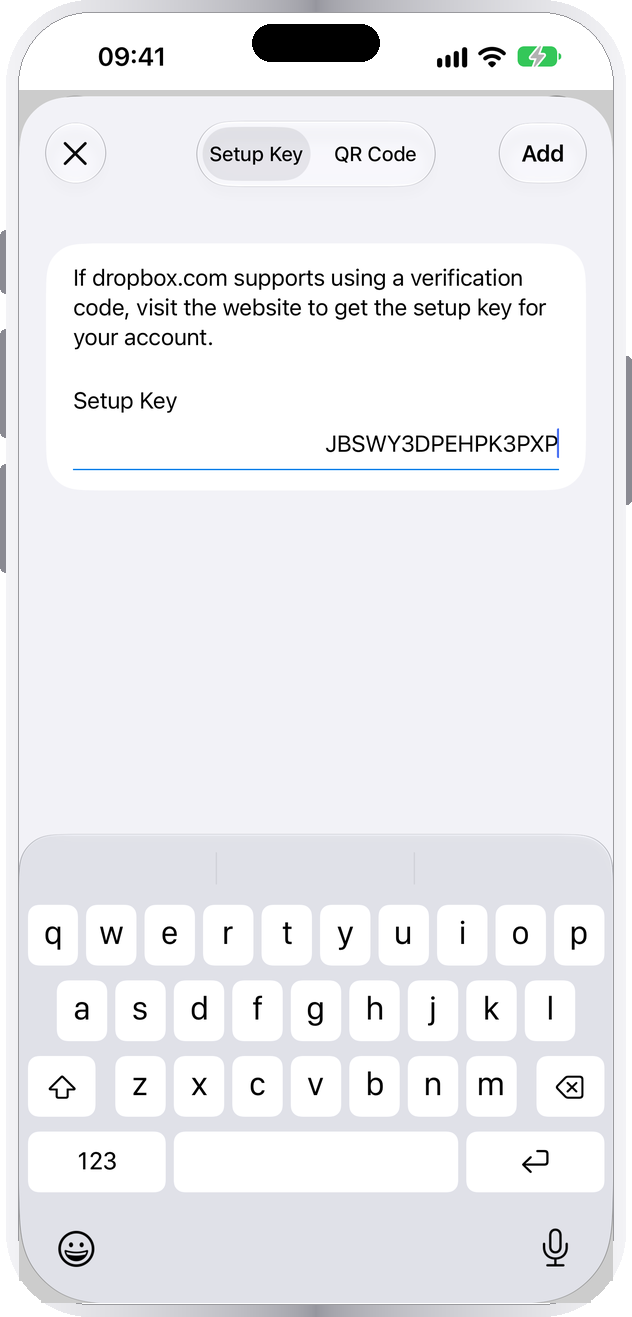
Scan or paste
Choose QR Code and point the camera at the site's code, or Setup Key and paste the key. Tap Add.
-
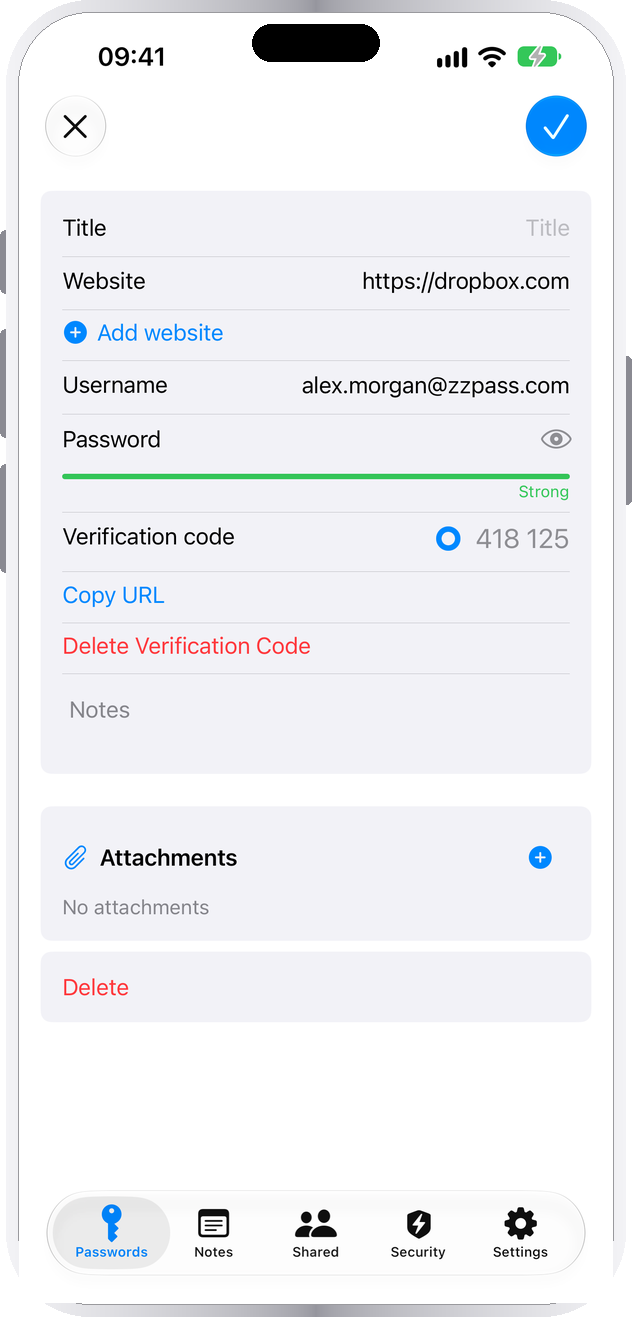
Save and confirm
Tap ✓ (Save before iOS 26) to save, then type the code ZZPass shows into the site to finish turning on two-factor.


On a Mac
Open the login, click Edit → Set Up Verification Code, and scan the QR code with your Mac's camera or paste the setup key.
From a setup link
If the site gives you an otpauth:// link, tap it. ZZPass opens and asks which login the code belongs to.
Keep the backup codes. Sites usually show a few one-time backup codes when you turn on two-factor. Paste them into the login's Notes.
Then you barely see it.
When a site asks for the code, ZZPass already has it ready.
Filled in for you
The code appears in the AutoFill bar above the keyboard, the same way your password did. Tap it.
Copied after your password
When ZZPass fills a password, it copies that login's code. Paste it into the next box. The clipboard clears after one code period, usually 30 seconds.
Turn it off in Settings → Security → Copy Verification Code on AutoFill.
Copy it yourself
Open the login. On iPhone, tap the code and choose Copy Code; on a Mac, click it. The ring shows how long the code has left.
Find every login that has a code with the Verification Codes filter at the top of your password list.
Works wherever an authenticator app does.
If a site offers an authenticator app, ZZPass works with it, free on every plan.
| What | In ZZPass |
|---|---|
| Code type | Time-based codes (TOTP). Counter-based codes (HOTP) aren't supported. |
| Code length and timing | 6, 7 or 8 digits, changing every 30 seconds or whatever the site sets |
| Algorithms | SHA-1, SHA-256 and SHA-512 |
| Setup | QR code, setup key, or an otpauth:// link |
| Moving in | Codes come with your logins from 1Password, Bitwarden, Apple Passwords and others. Import guide |
| Sync and sharing | End-to-end encrypted through your iCloud. Share a login and its code goes with it. |
| Paper backup | With Premium, the printed Emergency Kit includes each code's setup key |
If a code doesn't work.
The site says my code is wrong.
ZZPass says "Key is not valid".
JBSWY3DPEHPK3PXP. Spaces and dashes are fine; extra text around it isn't.ZZPass says "QR code not supported".
My codes aren't on my other devices.
I lost my phone. Are my codes gone?
Does deleting a code turn off two-factor for the site?
Is it safe to keep codes with my passwords?
Can I bring codes from another app?
One less app. Same codes.
The built-in authenticator is free for everyone, on iPhone, iPad and Mac.