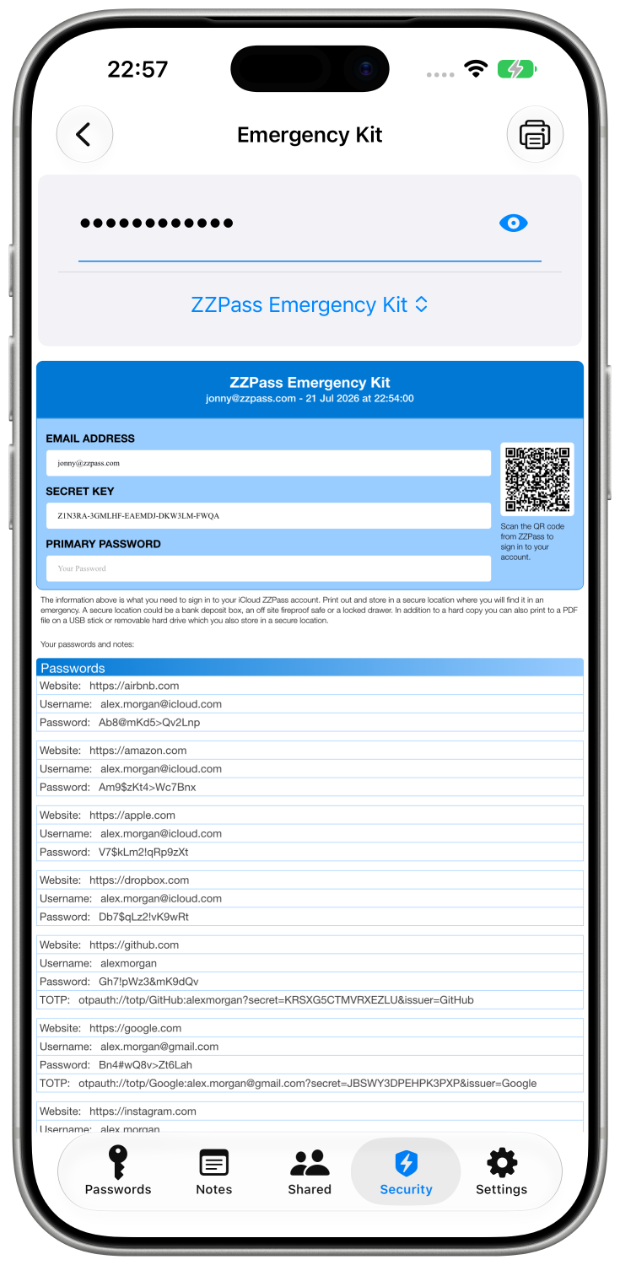
ZZPass turns your vault into a formatted paper backup, passwords, recovery details, and a scannable QR code, generated on your device and printed straight from it. Store it in a safe, a bank box, or a locked drawer.

Two print modes, pick the one that matches what you want to protect. Account recovery is included with every account; the full vault is Premium. Both come with the QR code, the date stamp, and the same archival-grade format.
The essentials to restore your ZZPass account on any device.
Your complete vault, printed and formatted for secure offline storage.
From opening Settings to holding the printed document, about as long as it takes to brew a coffee. Done once, useful for a lifetime.
On iPhone and iPad: Security › Access › Emergency Kit. On Mac, it lives in the sidebar.
Required every time you print. Biometric unlock alone isn't enough. If you can't enter the password, nothing prints.
Choose Account Recovery or Full Vault. Print to paper, or save as PDF to a USB drive.
Store it somewhere safe, a fireproof safe, a bank box, a locked drawer. Anywhere you'd keep something irreplaceable.
The Emergency Kit prints what's in your vault, so the first step is getting your passwords into it. That part takes a few minutes.
Free on iPhone, iPad, and Mac.
Import from a CSV, 1Password, or Credential Exchange, see the switching guide.
Security › Access › Emergency Kit. Three minutes, done.
The print flow is built around the assumption that the document leaving the printer is the most sensitive thing you'll create today. Every step reflects that.
Your primary password is required every time you print, biometric unlock alone isn’t enough, and there’s no "remember for 24 hours". Invalid attempts are rejected on the spot.
Every printout includes the exact date and time it was generated. You always know which copy is the most current, and which one to shred.
Uses your device's built-in print system: AirPrint on iOS, the system print sheet on Mac. The document never leaves your device. It is rendered locally and handed straight to your printer.
Save to a USB stick, encrypted external drive, or off-site storage instead of paper. Same archival format, digital file. Same password verification.
The Emergency Kit is generated locally and never uploaded anywhere. It exists only where you put it: on the page in your hand, the PDF on your USB, or the printer queue you trust.
The Emergency Kit is only as safe as the place you keep it, so the document says so on itself, right on page one. Pick somewhere you'd trust with a passport, a deed, or a stack of bills.
Fireproof, secure, and physically separate from your home. The classic choice for irreplaceable documents.
Fast access in an emergency. Pair with a fire-rated bag for documents you might need at 3am.
Convenient when you reprint often. A locked filing cabinet with a key you control beats a drawer you don't.
Save the kit as a PDF to an encrypted USB drive and store off-site. Same protection, smaller footprint.
"Print and store in a secure location where you will find it in an emergency. In addition to a hard copy, you can also print to a PDF file on a USB stick or removable hard drive which you also store in a secure location." PRINTED ON PAGE 1 OF EVERY EMERGENCY KIT
Insurance is invisible until you need it. Here are the moments where the Emergency Kit goes from a piece of paper in a drawer to the most useful thing you own.
Your phone is gone. Your Mac won't boot. Open the safe, scan the QR code on a borrowed device, and you're back into your account in seconds.
Forgot your primary password after a long trip? If biometric recovery isn’t available to you, the printed kit has everything you need to get back in, including the password itself, kept somewhere only you can reach.
If something happens to you, a trusted family member can use the Emergency Kit to access bills, accounts, and digital assets, exactly what you'd want them to find.
Not everyone is comfortable with apps, and nobody should have to be. A printed page needs no login, no tutorial, and no help from a grandchild, a parent or partner can read it, and that's the whole skill required.
Traveling internationally? Leave a printed backup at home. If your devices are lost or stolen, you have a safe path home that doesn't depend on what's in your bag.
RELATED HELPEmergency guideEmergency Kit helpAccount recovery