Premium · Digital legacy · Trusted contacts

Your passwords are safe.
Even if you're not.

Emergency Access lets people you trust request your ZZPass vault after a waiting period you set. Nothing becomes readable unless you fail to respond, so your secrets stay yours, until they need to be theirs.

  • End-to-End Encrypted
  • You Stay in Control
  • You Set the Wait Time
  • Revoke Anytime

Four minutes to set up. Then you never think about it again, nothing happens until someone asks, and you always get the final word.

Emergency Access is included with ZZPass Premium$2.99/mo or $29.99/yr, which also covers Family Sharing, unlimited shared groups, and the full-vault Emergency Kit. See plans →

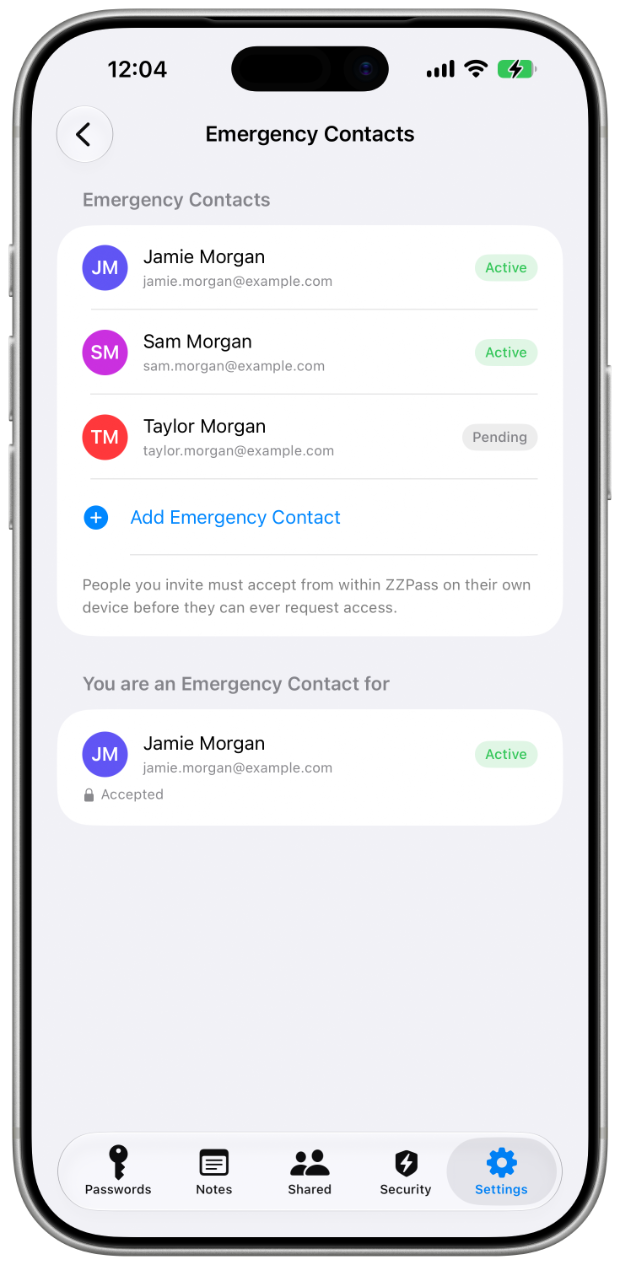
Emergency Contacts list in ZZPass on iPhone
Digital inheritance
Hundreds.
Of doors, behind one password

Every account you own, email, banking, taxes, photos, the lease, the will. A great password manager protects all of it, and that's exactly the problem when you need someone else to get in.

A hospital stay turns into a logout
You're unreachable for a week. Two-factor codes pile up. Bills go unpaid. Nobody can log in to anything.
A new phone, an old vault
A loved one inherits the laptop but not the primary password. Years of receipts and photos sit behind a screen they can't pass.
You wrote it down, somewhere
The paper copy is in a safe, in a city, in a drawer no one remembers. Convenient. Until it isn't.
How Emergency Access Works

Three steps. One quiet handoff.

You decide who, and how long they wait. ZZPass holds the line for you, even when you can't.

1Add Contacts

Choose the people you'd trust with everything.

Name the people you'd trust with everything, then set the waiting period that applies to them, 24 hours, or up to 30 days. Your contacts use ZZPass too, so a request never travels outside the app.

EM
Emma Mercer
Trusted contact
2Request

If something happens, they ask.

From their own ZZPass app, your contact taps "Request Access." You get a push notification and an email. The clock starts, and you have your full wait period to say no.

Request from Emma 15h left
15:42:08
3Unlock

If you don't respond, the vault opens for them.

Only after your wait period elapses, and only for the contact who requested it. They get the level of access you granted them, read-only, or read and write. You can revoke at any moment, before or after.

Vault unlocked for Emma
Read-only · full vault
Active Requested access Access granted Every contact shows one of these three states, no hidden countdowns.
Owner Controls

You decide everything.

Emergency Access only triggers if you fail to respond. Until then, you set who, what they can do, and how long, and you can change any of it from any of your devices.

You set the waiting period
24 hours, 7 days, 14 days, or 30 days, choose how long a request has to sit before it opens.
Read-only, or read and write
Access always covers the whole vault, you decide whether a contact can only view it, or change things too.
Deny in one tap
A single button on any device kills an in-progress request before the timer ends.
Revoke at any time
Even after access is granted, you can pull it back, their session ends and nothing further syncs to them.
9:41 •••
Emergency Access · Waiting period

How long should a request wait?

If a trusted contact requests access and you don't respond, they'll receive the access you granted them after this period.

  • 24 hoursShortest
  • 7 daysShort
  • 14 daysRecommended
  • 30 daysLongest
Privacy & Security

Not trust. Cryptography.

Emergency Access doesn't weaken your encryption. It inherits it. Arming it escrows one sealed key, never your content, and nobody in between can read a thing.

Zero-knowledge by design

When you arm Emergency Access, the only thing escrowed is an access key already sealed to your contact, never your vault, never your content. We can't unwrap it, so a copy is useless to us.

Time as a second factor

The waiting period is enforced on your devices, on theirs, and at the escrow. All three have to agree before that sealed key is released, and a clock changed on any one device won’t move it.

More than one way to deny

Push and email, independently of each other. If either channel reaches you, the request stops with a single tap.

You choose their access level

Grant read-only so a contact can look but not touch, or read and write if they may need to act on your behalf. Either way, it's your call, set before anything ever happens.

Revocable at any time

Granted access never becomes permanent. Revoke a contact and their access ends, they stop receiving your vault, and nothing new ever reaches them.

A record of every step

Requests, denials, unlocks, and revocations are timestamped, so the history of who asked and what happened is always there to check.

How It Compares

Quietly the safer way to share.

The alternatives ask you to hand over the secret itself. Emergency Access delivers the access without ever giving up the secret, and pairs naturally with a printed Emergency Kit as your offline backstop.

Feature
Emergency Access
Paper alone
Sharing primary password
End-to-end encrypted
Always
Plain text
Defeats it
Time-locked recovery
You set the wait
None
None
Deny / revoke later
Any device
Burn the paper
Reset everything

A printed Emergency Kit is still worth having: it covers the case where you are locked out. Emergency Access covers the case where someone else needs in.

Digital estate planning

What happens to my accounts
if I'm not there?

What happens to my online accounts when I die?
Without a plan, they usually become unreachable. Providers each have their own process, most require death certificates and legal paperwork, and many accounts simply stay locked forever, subscriptions billing, photos inaccessible, domains lapsing. Emergency Access sidesteps that by letting someone you named request your vault directly, so your family works from your actual credentials instead of a court process.
How is this different from writing my passwords down for my family?
A written list is readable the moment someone finds it, and out of date the moment you change a password. Emergency Access hands over nothing today: your contact holds no key until they request access and the waiting period elapses without you declining. Your vault also stays current, so what they eventually reach is what you actually use.
Can I name a password executor for my estate?
Yes, that's the intended use. Add your executor, attorney, or next of kin as a trusted contact and set a waiting period long enough that you'd notice and decline a premature request. Many people pair a short wait for a partner with the knowledge that a longer one suits a professional executor.
Do I still need this in my will?
Mention it. Emergency Access is the mechanism, but your executor needs to know it exists, note in your estate documents that your passwords live in ZZPass and who you named. We're not lawyers, so check how digital assets are handled where you live.
What if a trusted contact asks for access while I'm perfectly fine?
You're notified as soon as the request is made, and declining takes one tap. Nothing opens until the full waiting period passes without a response from you, and you can remove a contact entirely at any time.
If everything is encrypted on my device, how can access happen without me?
Arming Emergency Access deposits one thing with a small ZZPass escrow: an access key already sealed to your trusted contact, alongside the waiting period. Your passwords and notes never go there. We can’t unwrap that key or release it early, and when the wait elapses without a response from you, only your contact can use it.
Does ZZPass ever hold my primary password?
No. Your contacts receive access through their own ZZPass account, and nobody, including us, learns your primary password in the process.

RELATED HELPEmergency guideEmergency Kit helpAccount recovery